Payment calendar
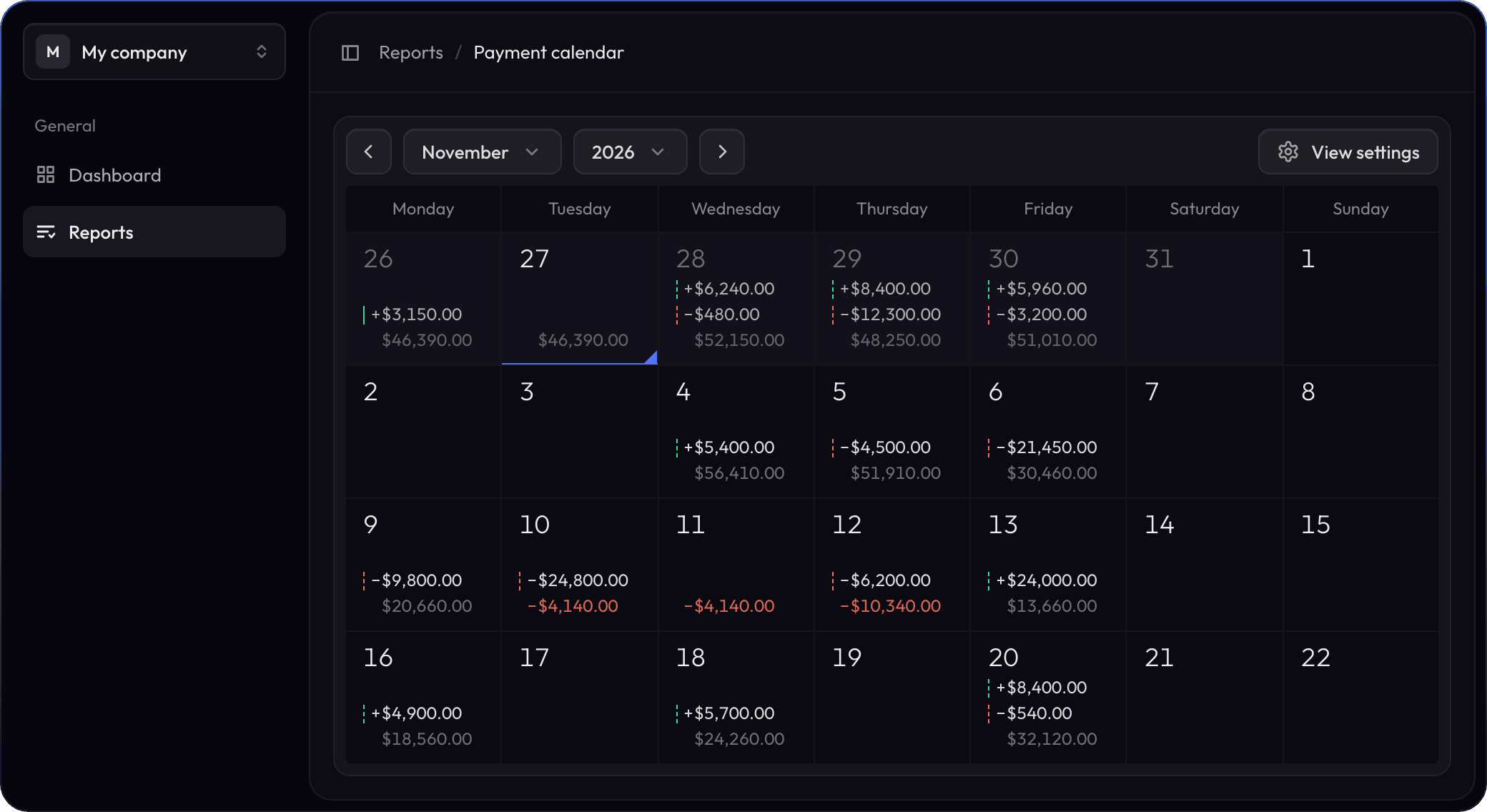
See your balance on any date: recurring and planned transactions on one calendar, and a cash gap visible before it happens.
14 days free. No credit card required.
Where cash gaps come from
What happens when upcoming payments live in a spreadsheet and in someone’s memory.
The gap you find on the day
Each payment looks affordable alone. Together they take the balance below zero.
The payment nobody wrote down
If it isn’t in the sheet, the first sign of it is the balance dropping.
The sheet that is always behind
It was right on the day someone updated it.
How the calendar works
Three things go in. A balance for every day comes out.
Balance today, Oct 27: $46,390.00
Today’s balance across bank, crypto and manual accounts.
What the calendar does
Any day’s balance, plan next to actual, and recurring transactions you set once.
Any day, in full
Open a day in the calendar to see what comes in, what goes out and what is left.
Plan next to actual
Planned transactions sit beside bank transactions, and one switch hides them. You can plan years ahead.
Set once, repeats on schedule
Give a recurring transaction a frequency: daily, weekly, monthly or yearly.
The same payments in every report
The calendar shows them by day. Reports show them by period and in one currency.
Who it’s for
Anyone who has to answer “can we pay this?”
Roles
All your financial data together
Built on secure financial infrastructure
Your financial data is protected at every step, from connecting a bank to exporting.
- Read-only bank access through Open Banking providers and banks' official APIs. Payments can't be initiated.
- The database, backups and app servers run in Frankfurt (EU).
- Roles and access to selected accounts only.
- Export your transactions to CSV any time, on any plan.
- Our DPA and list of sub-processors are public.
Frequently asked questions
Basic, Pro and Enterprise. You can try Pro free for 14 days, no credit card required.
Years ahead. Recurring transactions are placed on the calendar for the whole period.
A planned transaction doesn’t turn into an actual one by itself. Once the payment goes through, delete it or move its date; on a manual account you can simply confirm it. Automatic matching with bank transactions is on our roadmap.
Everything is shown in your workspace currency. Today’s balance uses the latest rate; a past day uses that day’s rate.
All of its planned occurrences that aren’t approved yet, overdue ones included. Approved transactions stay unchanged.
Yes. Turn off “Show planned data”, and the calendar shows only what has already happened.
Start with today’s balance
Banks, crypto wallets or a manual account.
Recurring transactions with a frequency, planned transactions with a date.
Pick a day and see what is left.